Showing posts with label using. Show all posts

Monday, May 29, 2017

No Root Play Pokemon Go without Walking by using this App

No Root Play Pokemon Go without Walking by using this App


# IMPORTANT: Please read! #
1. When using a joystick Pokemon GO will only work over marshmallow version.
2. Use the joystick mode operates at normal Anhalt Pokemon GO.
3. Other versions can use fixed positioning hasilsu Allow mock locations after you restart the revocation check Pokemon GO after setting position because the check Allow mock locations in Pokemon GO (Note: Allow mock locations termination)
- Use joystick -
1. Move the joystick can be positioned by dragging around
2. Click and hold the joystick feature hidden around the joystick
3. Set the joystick can be moved away from the Preferences

# # Developer Mode
Developer mode being activated - 1. Settings - About phone - Software - Build number (7 clicks).
Using the app 2. Settings - Developer Options - or mock locations Allow mock locations apps selection (FlyGPS)

Download here
GPS APK

Go to link for download

Read more »

Sunday, May 21, 2017

how to Unlock your Android device using Android Device Manager ADM

how to Unlock your Android device using Android Device Manager ADM


 the primary reason to set up some sort of lock screen security on your smartphone is to keep strangers (or friends) from checking out your document, messages or private pictures.
 Beyond that, you don’t want anyone who dares to steal your phone to get full access to your mails, pictures or other private  files . 
But what if you’re the one who cannot access your phone? 
you could forget your password or pin , right .
by the way , there’s quite an easy solution to this .with out walking up and down shouting hey I am gone. 
without smashing your phone against a wall (or your friend’s face). 
The only thing you need is to have Android Device Manager enabled on your device (before you locked yourself out of your phone).
 If you have a Samsung phone, you can also unlock your phone using your Samsung account.
Unlock your Android device using Android Device Manager (ADM)
As already mentioned, the following method only applies to devices that have Android Device Manager enabled.
1.
On your other (friend) mobile phone or computer  visit: google.com/android/devicemanager
2.
Sign in using your Google login details that you also used on your locked phone.
3.
On the ADM interface, select the device you want to unlock (if it isn’t already selected).
4.
Select ‘Lock’
5.
In the appearing window, enter a temporary password, You don’t have to enter a recovery message.
Now click ‘Lock’ again.
If it was successful, you should see a confirmation below the box with the buttons Ring, Lock and Erase.
6.
On your phone you should now see a password field in which you should enter the temporary password.
7.
This should unlock your phone.
Now, before you go on with your life, go to your phone’s lock screen settings and disable the temporary password.
That’s it you free to go.
     But if the above solution did not work for 
your phone, then use this factory reset format.
Note:this method factory reset ,will format every thing that is in the phone, in fact it will bring your phone as if its new phone .
                          5 Steps 
1
First turn off your phone, then remove your sim card and SD card.
2.
Press the down volume button and power button together. For some phone its the up volume button.
3.
Then on the screen you will see wipe data/factory reset then use your down volume button to scroll down to that then use your power button to select or up volume button to select.
4.
On the screen you will see yes, use volume button to scroll to yes then use power button to click select .
5
Do your normal phone settings, then your phone is good to go"your phone is back again. 

Go to link for download


Read more »

Wednesday, May 3, 2017

How to change the imei of your andriod devices using chamelepon apk

How to change the imei of your andriod devices using chamelepon apk


hello guys, i can see some people still dont no how to change the imei of there android device am using is means to teach how you can change the imei of your android device.
 first download chamelepon apk from play store or download it here
After downloading install it and open it. to know the imei  of your andriod device dail this code on your device   *#06# you will see a pop message like this below

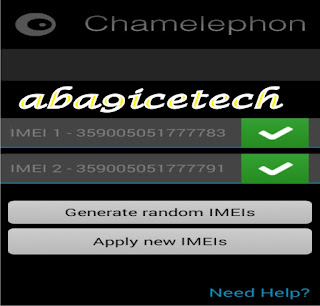
this is  imei of this device above  ,so let now see how to change imei using chamelephon after installing it open it
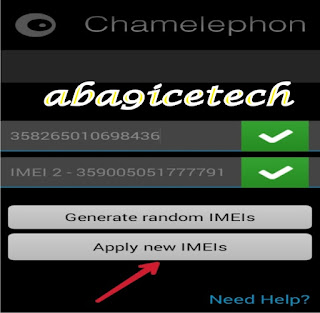
press the  place you want change  the imei and input the imei you want to use like the screen shoot above
then press apply new imei where the red arrow in screen shoot is facing. then try the code again *#06# to confirm maybe your imei have being change example look at the screen shoot below
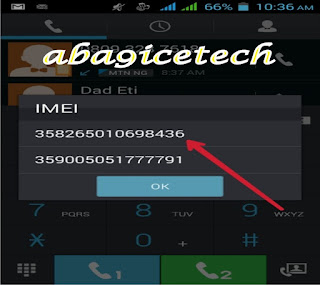
you can see from the screen shoot above that the imei have being change completely but, shut down your device before using the code. i hope you can change your imei of your android device on your own. if you have any qustions use the comment box below and we shall get back to you


Go to link for download

Read more »

Wednesday, April 12, 2017

Glo cheat 0 0k using Ucbrowser handler with unlimited download

Glo cheat 0 0k using Ucbrowser handler with unlimited download


New settings for glo0.0k via browser handler unlimited download and browsing
first send Payu to 127
reboot your phone
open the ucbrowser handler
Device user agent
Android
Web user agent
Safari
Handler download limit
9991
tick remove port
proxy server type: dual real host
proxy server:redirect.glo.com/aba9icetech@
real proxy server type:direct
port:3128
you can use it view any site
How to use it to download any any film or music,games
goto site like http://tvshows4mobile.com
to download season film
pick d film you want to download
you will see 3gp and mp4
pick mp4
press download
goto d download side
long press on what you are downloading
you will see three dot as option
press it
press details
scroll down
press copy
press back
long press d film again
press something like basket
press delete
press back
press new tab
goto webproxy site like
http://proxytool.cf
clear the http:// in the box
long press the box
press paste
press go or surf
it will bring browse.php
clear the browse.php
put the name of the file
I.e if it is film
name of the film
e. g arrow
then put.  .mp4 or.  .3gp
name of the music
e. g ogede
then put.   .mp3
name of PDF file
e.g agriculture
then put   .pdf
name of app
e. g antivirus
then put.     .apk
then press download
Second method
Copy the download link
like http://tvshows4mobile.cocf
You will see 3gp and mp4
Press the top of the page
Press copy
Open new tab
Goto http://proxytool.cf
clear the http:// in the box
long press the box
press paste
press go or surf
it will bring browse.php
clear the browse.php
put the name of the file
I.e if it is film
name of the film
e. g arrow
then put.  .mp4 or.  .3gp
name of the music
e. g ogede
then put.   .mp3
name of PDF file
e.g agriculture
then put   .pdf
name of app
e. g antivirus
then put.     .apk
then press download
Note:in case the download stop, open new tab, go to Facebook.com, login nd the download continue
then you are good to go

Go to link for download

Read more »

New Unlimited Airtel 0 0KB Using Psiphon Pronet Queencee Psiphon A Pro Now Active

New Unlimited Airtel 0 0KB Using Psiphon Pronet Queencee Psiphon A Pro Now Active


Long time, No swindle! Lolzzz Airtel is back again with a great bursting boundless free perusing utilizing any kind of VPN which can skirted servers like Psiphon, Pronet, Netify, Psiphon A+ Pro, Queencee, XP Psiphon, Guruznixkid UC little handler or VPN and numerous other modded VPNs you know.

This free perusing is boundless and quick which can be utilized to power all applications and to download boundlessly. We should look at the settings.

The most effective method to Browse Unlimitedly Using Airtel 0.0KB

Firstly, you require a Vpn sympathetically download psiphon 108 by clicking here and set your APN at default. You can now arrange your psiphon like this beneath;

Check REMOVE PORT
  • Mark REMOVE PORT
  • PROXY TYPE: No proxy
  • PROXY SERVER: Airtellive.ng
  • REAL PROXY TYPE: Default
  • REAL PROXY SERVER: Leave Empty
  • REAL PROXY PORT


Then tap on SAVE and choose UNITED STATE as your country region and finally go to MORE OPTIONS with this below configuration set up.


HOST ADDRESS: 172.24.248.150
PORT: 8080


You can now go back and tap on START. So browse and download unlimitedly while it last.

Go to link for download

Read more »

Wednesday, March 8, 2017

How to get your group link without using whatsapp prime

How to get your group link without using whatsapp prime


Hello guys, I believe many of us now have whatsapp groups but, the problem is getting the group invite link the only solution then is using only whatsapp prime to get your group invite link but here is another way to get your groups invite link via your normal whatsapp

Do you with the new updated  whatsapp you can get your group invite link without using whatsapp prime?
Yes is possible all you need to do is update your whatsapp to the current one from playstore.
Step 1
Log on to your whatsapp then "do a long tap" on the group you want to create invite link for and click the three vertical dot and click "Group

Step 2
After clicking, you will see your whatsapp group invite link and you can do below with it :
Send link via whatsapp
Copy link
Share link
Revoke link
Below are the snap shoot to prove.
For more info you can use the comment box below


Go to link for download

Read more »